Case study · IoT + Android · 2019
A water tank that keeps itself full. It measures its own level, runs the pump on its own, and reports to your phone every second.


An IoT system that measures the water level in a tank, keeps it between two limits by switching a pump on and off, and brings it all to an Android app over Wi-Fi.
An HC-SR04 ultrasonic sensor on the lid times the echo from the water surface, and the Arduino Uno turns it into a fill level.
When the level drops to the minimum, a relay starts the pump. It stops at the maximum, so the tank never runs dry or overflows.
An ESP8266 serves the readings over Wi-Fi. The Android app shows a live, animated tank and lets you change both limits.
Rooftop and garden water tanks are usually filled by hand: someone notices the tap running dry, starts the pump, and then has to remember to stop it before the tank overflows. Smart Water Tank takes that job away.
A small Arduino controller watches the level with an ultrasonic sensor and drives the pump through a relay, keeping the water between a minimum and a maximum. An ESP8266 module puts the tank on Wi-Fi, and an Android app shows the level as a live, moving wave, and lets you choose both limits from your phone.
System data flow: readings travel from the tank to the phone, new limits travel back
The HC-SR04 sends an ultrasonic pulse and the Arduino times its echo from the water.
The Arduino compares the level with both limits and switches the pump relay.
Every 500 ms it writes status, level, max and min to the ESP8266 over a serial link.
The ESP8266 keeps the latest frame and serves it over Wi-Fi from a small web server.
The app polls the server every second, and sends new limits back the same way.
CONTROLLER
The controller: it reads the sensor, runs the control loop, drives the relay and talks to the Wi-Fi module through SoftwareSerial on pins 2 and 3.
GATEWAY
The gateway: it joins the home network and runs its own access point with a fixed address, 192.168.11.4, so the app always knows where to find the tank.
CLIENT
The dashboard: two screens in a bottom navigation, a live view of the tank and a form to change the limits, built with OkHttp and the Navigation Component.
The three devices share one tiny, plain-text protocol. A reading is a single 10 byte frame with four space-separated values: the pump status, the level, and the max and min limits. New limits travel the other way as a 5 byte frame, zero padded so its length never changes. Fixed sizes keep the serial code simple: each side reads exactly one frame at a time.
GET/dataArduino → ESP8266 → app, every 500 ms
POST/get · post=app → ESP8266 → Arduino, on Apply
ArduinoToEsp.inoSoftwareSerial mySerial(2, 3);
char Status[10] = "1 80";
char MaxMinLevel[10] = "90 50";
char myStr[10];
void loop() {
// status level max min, in one 10 byte frame
strcat(myStr, Status);
strcat(myStr, " ");
strcat(myStr, MaxMinLevel);
mySerial.write(myStr, 10);
// new limits from the app, sent back by the ESP8266
while (mySerial.available()) {
mySerial.readBytes(MaxMinLevel, 10);
}
memset(myStr, 0, sizeof(myStr));
delay(500);
}
WebServer.ino · ESP8266IPAddress ip(192, 168, 11, 4);
void setup() {
WiFi.mode(WIFI_AP_STA);
Serial.begin(115200);
server.on("/data", sendDataToWeb);
server.on("/get", getDataFromAndroid);
server.begin();
WiFi.softAPConfig(ip, gateway, subnet);
}
void loop() {
server.handleClient();
while (Serial.available()) {
Serial.readBytes(data, 10);
}
}
void sendDataToWeb() {
server.send(200, "text/plain", data);
}
void getDataFromAndroid() {
getData = server.arg("post");
server.send(200, "text/plain", "OK");
getData.toCharArray(sendSerial, 10);
Serial.write(sendSerial);
}
READ
Returns the latest frame from the Arduino as plain text, such as 1 80 90 50.
WRITE
Takes the new limits from the form field post, replies OK, and writes them to the serial link.
UART
Both boards talk at 115200 baud. The ESP8266 forwards bytes in both directions without parsing them.
NETWORK
In AP + STA mode, the module joins a network and runs its own access point at the same time.
The tank works on its own, with or without the phone. As water is used, the level slowly drops. When it reaches the minimum, the Arduino closes the relay, the pump starts and the status turns to filling. When the water reaches the maximum, the relay opens and the tank goes back to idle.
Two separate limits give the loop hysteresis: the pump runs in long, complete cycles instead of switching on and off around a single point. The animation replays the cycle from the demo build of the app, from 90 % down to 50 % and back, with the live serial frame underneath.
Serial frame
The control loop, replayed from the demo build of the app
HC-SR04
The sensor sends a 40 kHz pulse. Half the echo time multiplied by the speed of sound gives the distance to the water.
LEVEL
The empty space above the water, compared with the tank height, becomes a fill level from 0 to 100 %.
HYSTERESIS
At or below min, start filling. At or above max, stop. Anywhere in between, keep doing what you were doing.
RELAY
A relay lets the 5 V Arduino pin switch the pump's own power supply, keeping the two circuits separate.
The Android app has two screens, Home and Options, in a bottom navigation bar. Every label uses the handwritten Courgette typeface, and white cards with soft shadows keep the readings easy to scan.
HOME
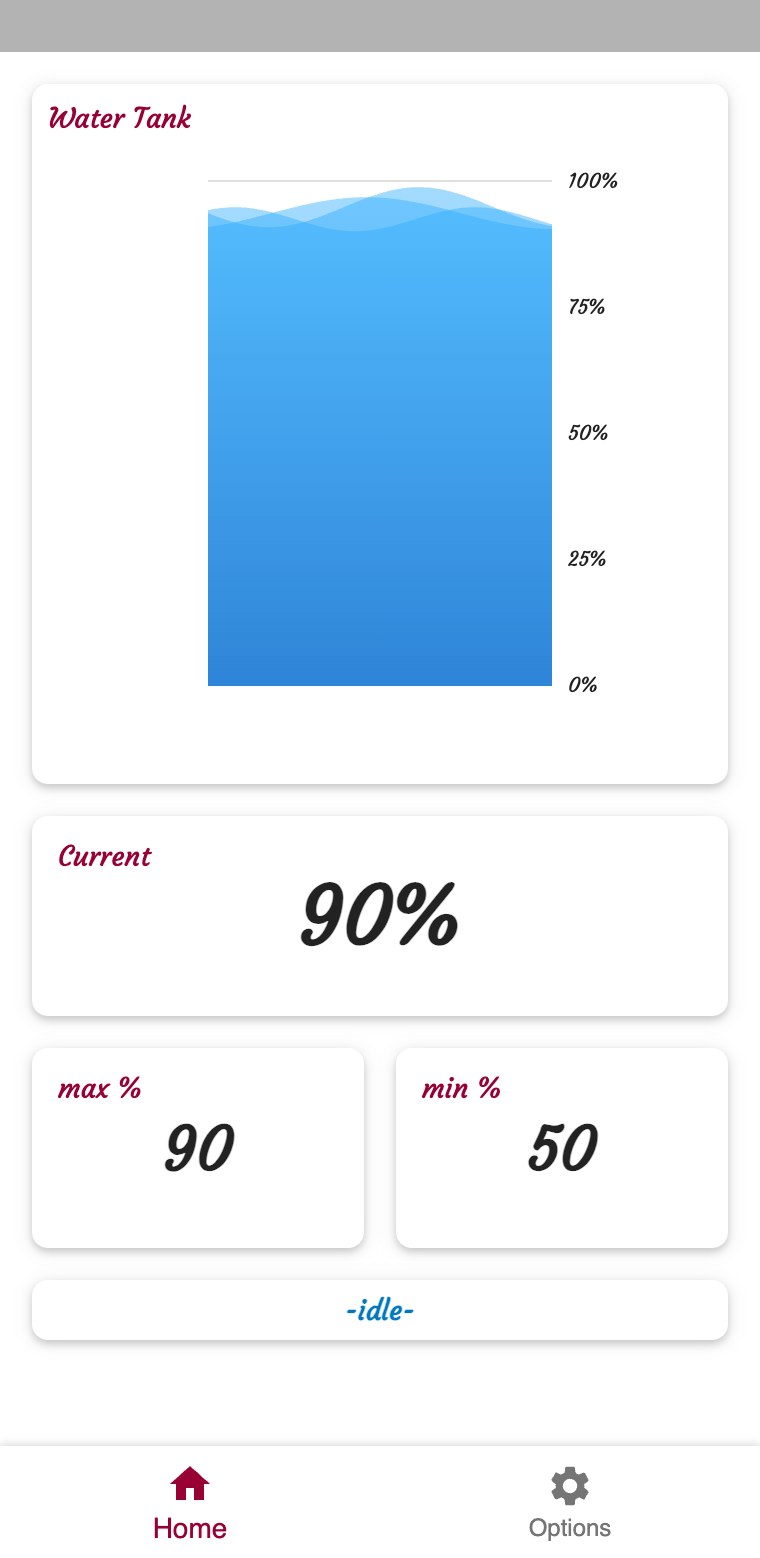
The tank sits at 90 %, the maximum, and the pump is off: the status bar reads idle.
HOME
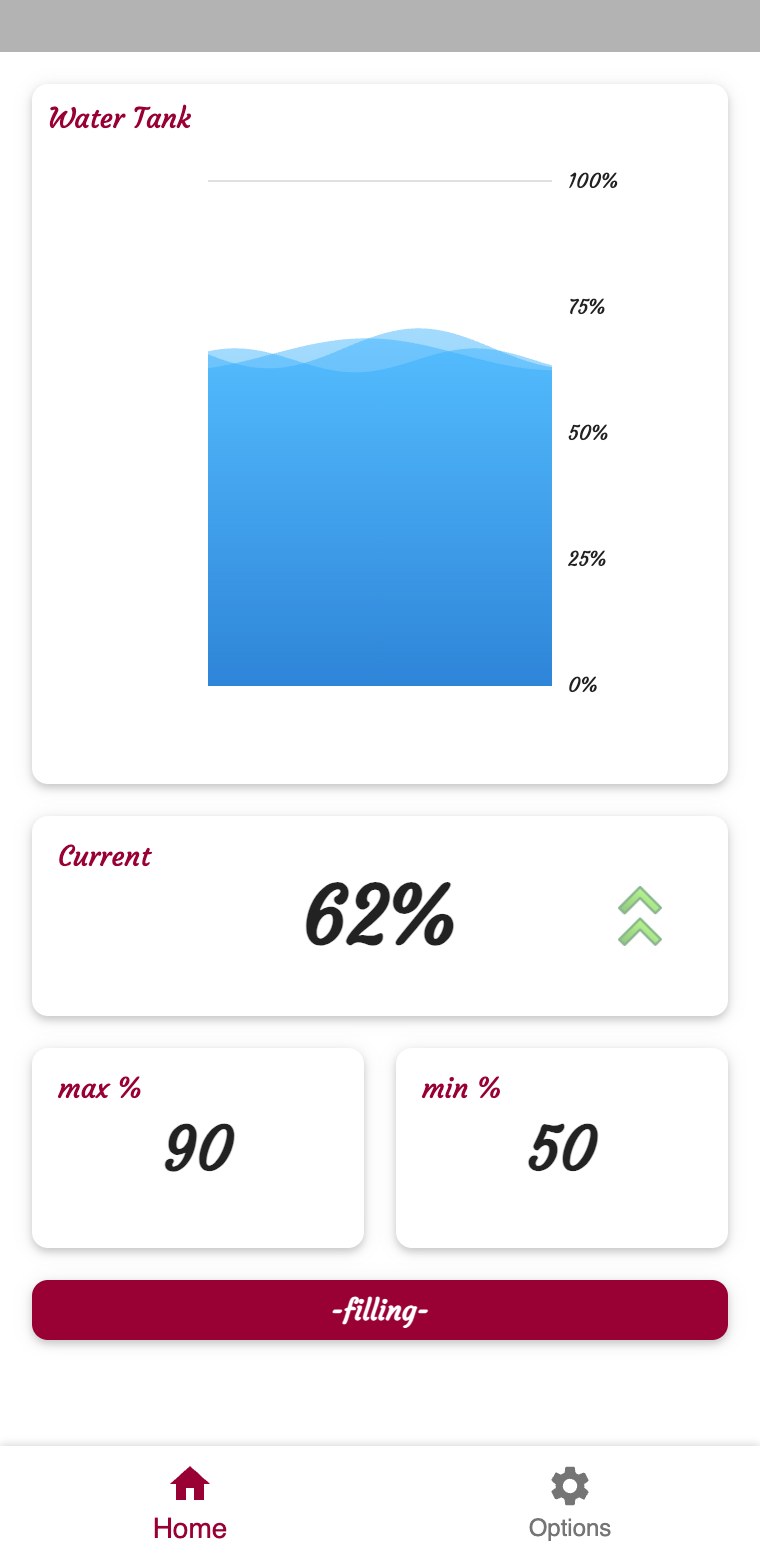
The level dropped to the minimum, so the pump is on. The status turns red and green arrows blink.
OPTIONS
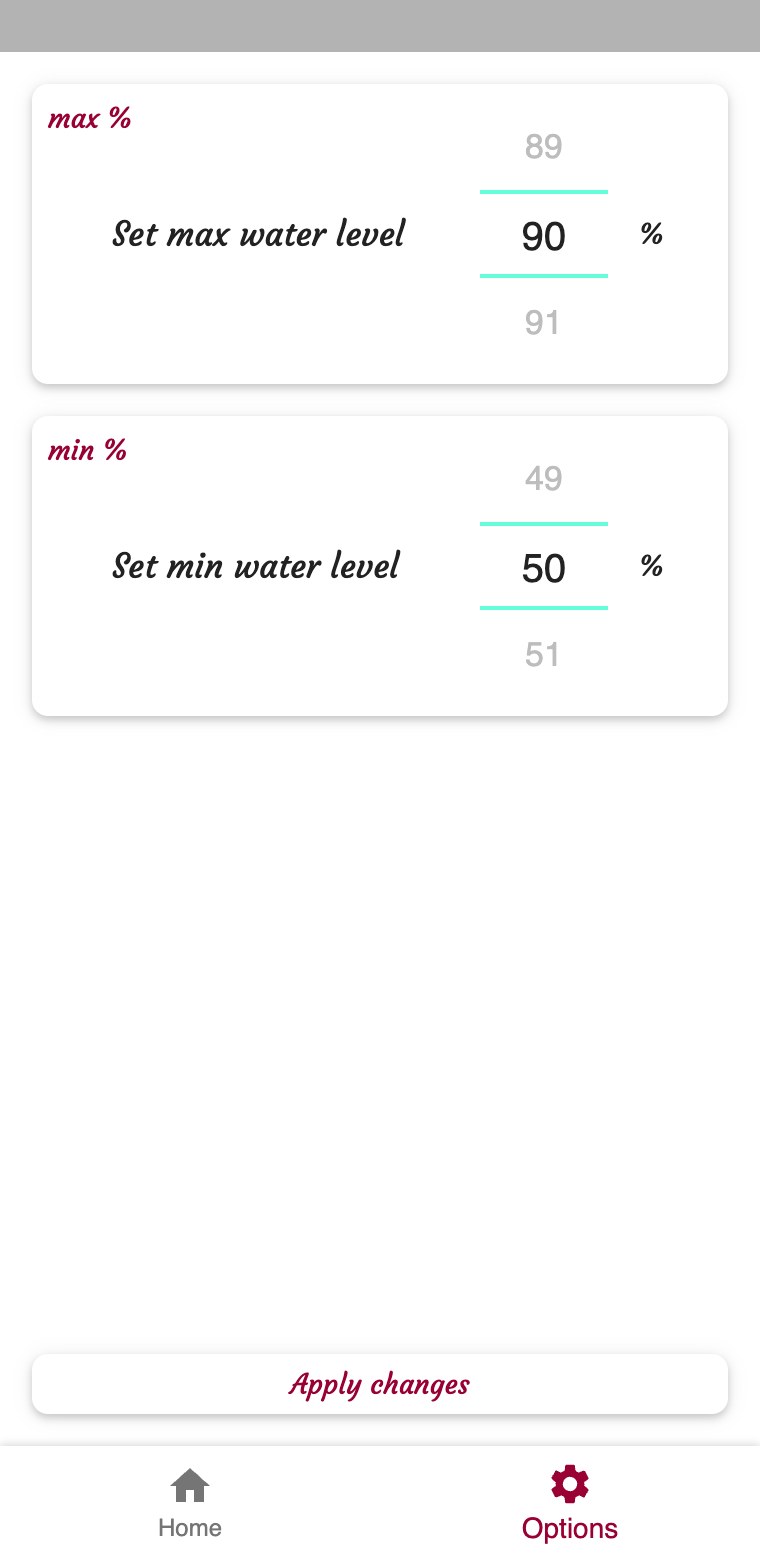
Two number pickers, from 0 to 100 %, preset with the limits the tank is using right now.
OPTIONS
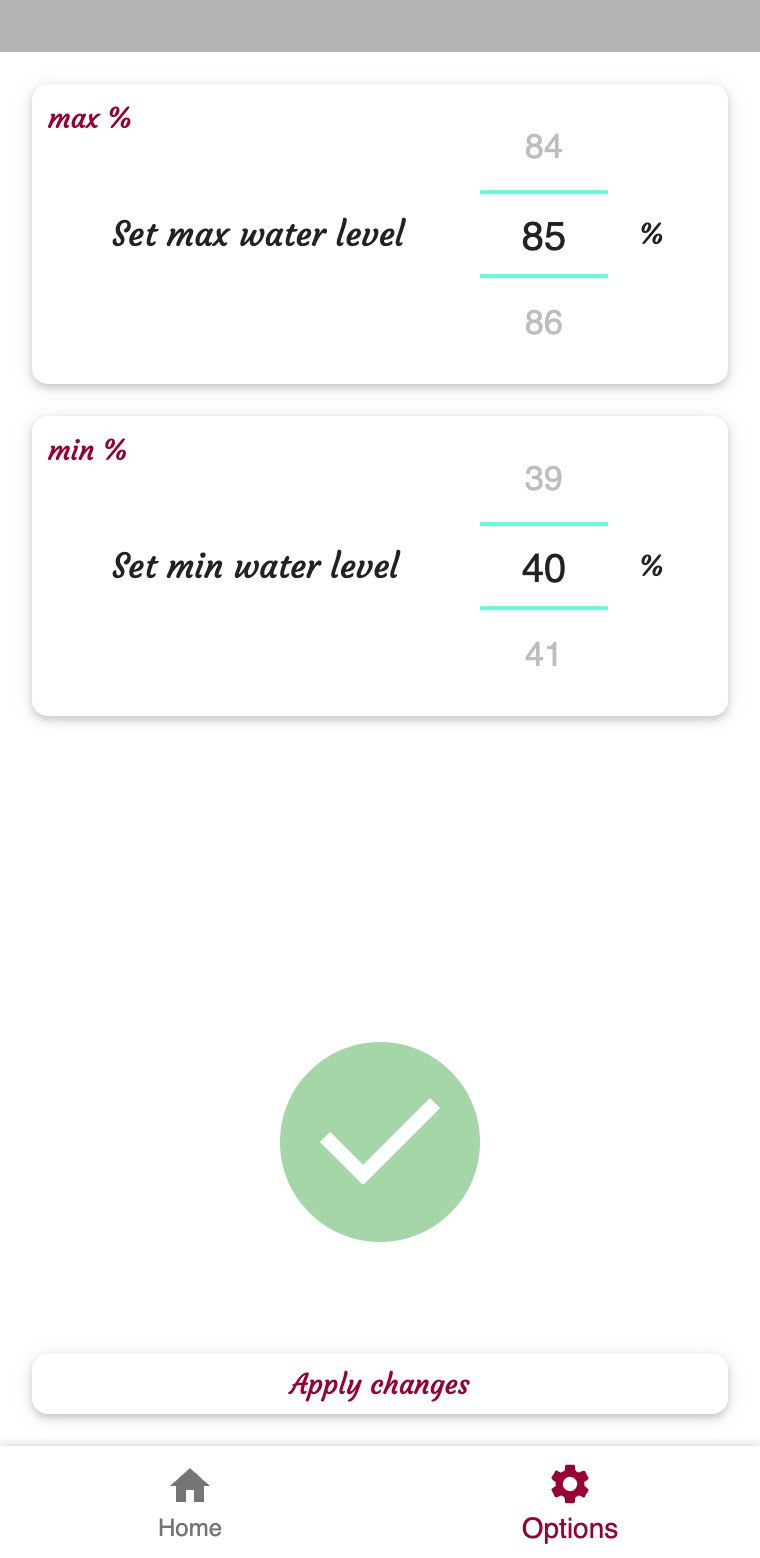
After Apply changes, a green check draws itself while the new limits travel to the tank.
HomeFragment · live data// every second: GET http://192.168.11.4/data
String[] data = myResponse.split("\\s+");
if (data[0].equals("1")) {
status.setText("-filling-");
statusCard.setCardBackgroundColor(Color.parseColor("#990033"));
arrow.setVisibility(View.VISIBLE);
Animation anim = new AlphaAnimation(0.0f, 1.0f);
anim.setDuration(1000);
anim.setRepeatMode(ValueAnimator.REVERSE);
anim.setRepeatCount(ValueAnimator.INFINITE);
arrow.setAnimation(anim);
} else {
status.setText("-idle-");
statusCard.setCardBackgroundColor(Color.WHITE);
arrow.setVisibility(View.INVISIBLE);
}
waveProgress.setProgress((float) (Integer.parseInt(data[1]) + 5) / 100);
max.setText(" " + data[2] + " ");
min.setText(" " + data[3] + " ");
The Home screen asks the ESP8266 for /data once every second, using OkHttp on a background thread and a Handler to schedule the next request. The answer is split on whitespace into its four values.
The level drives a MultiWaveHeader, turned upside down, so it looks like water moving inside the tank. When the pump is on, the status card turns red, and two green arrows blink with an endless AlphaAnimation.
OKHTTP
A Handler posts the next request 1000 ms after the last one, for as long as the screen is open.
VIEW
A MultiWaveHeader with a blue gradient, a speed of 2 and 10 dp waves shows the level as moving water.
ANIMATION
On open, the wave rises from 0 and the number counts up, with an ObjectAnimator and a ValueAnimator over 1.2 s.
STATUS
While the pump runs, two green arrows fade in and out every second, next to the current level.
The Options screen first reads /data to preset both pickers with the current limits. After you choose new ones and press Apply changes, the app zero pads them into a 5 byte frame and sends it to /get as a form POST on a background thread.
The ESP8266 replies OK and writes the frame to the serial link, and the Arduino uses the new limits from its very next cycle. On the phone, a green circle with an animated check mark confirms the change, then fades away after two seconds.
OptionsFragment · apply changesint max = numberPickerMax.getValue();
int min = numberPickerMin.getValue();
// zero padded, so the frame is always 5 bytes: "MM mm"
String maxString = max < 10 ? "0" + max : "" + max;
String minString = min < 10 ? "0" + min : "" + min;
String postString = maxString + " " + minString;
RequestBody formBody = new FormBody.Builder()
.add("post", postString)
.build();
Request request = new Request.Builder()
.url("http://192.168.11.4/get")
.post(formBody)
.build();
Response response = client.newCall(request).execute();
An ultrasonic distance sensor, mounted on the lid, facing the water.
The ATmega328P board that runs the sensor, the relay and the loop.
A Wi-Fi module running a web server, wired to the Uno over UART.
A relay module switches the water pump on and off.
C++
The controller sketch: it builds the status frame, writes it every 500 ms and reads new limits back.
C++
The ESP8266 sketch: ESP8266WebServer routes, the static access point and the serial bridge.
JAVA
Polls /data, parses the frame, and animates the wave tank, the counter and the status.
JAVA
Presets the pickers, posts new limits with OkHttp and plays the check mark animation.
A complete loop from sensor to smartphone: a tank that fills itself between two limits, a 10 byte protocol shared by three devices, and an app that shows the water moving live and changes the limits in one tap.
Replace polling with MQTT push updates, keep the Wi-Fi credentials out of the firmware, secure the API with HTTPS and authentication, reach the tank from outside the home network, and add usage history charts and low-water notifications.