Smart Home logo

Case study · Bachelor's thesis · IoT + Android · 2019

Smart Home IoT System

A house that senses its environment, warns you of danger and listens to your voice. Built end to end, from the sensors to the Android app.

CArduino UnonRF24L01Raspberry Pi 3 B+PythonMySQLApachePHPJavaAndroid SDKSpeech recognitionText to Speech
Explore the architectureMeet the app
Weather screen with outside conditions in Bucharest
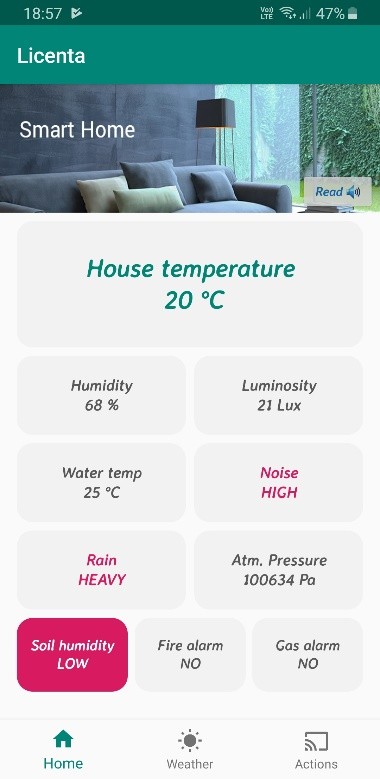
Home screen with live house status tiles
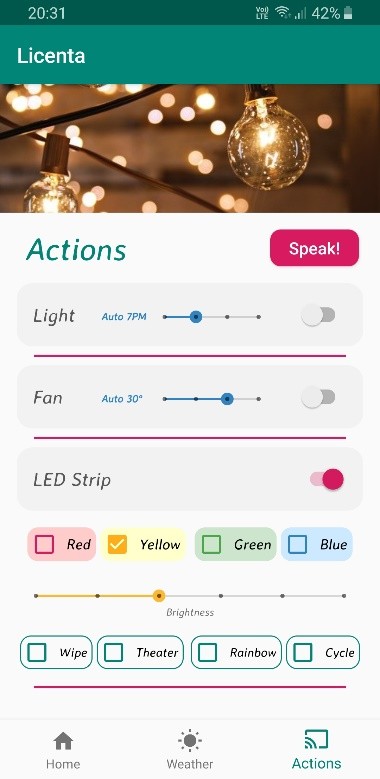
Actions screen controlling the lamp, fan and LED strip

A complete smart home system with voice and mobile control: sensors watch the house, a Raspberry Pi runs it, and an Android app puts it in your hand.

Sensing

Environmental and safety sensors wired to an Arduino Uno, which turns raw signals into meaningful values and sends them over a 2.4 GHz radio link.

Server

A Raspberry Pi 3 B+ stores everything in MySQL, publishes it through PHP APIs on Apache, and drives the connected devices from Python.

App

An Android app shows the state of the house and the weather outside, raises alarms, and controls every device by touch or voice.

10live readings
32byte radio payload
3connected devices
4programming languages

THE IDEA

Smart homes are residences equipped with devices that collect and process information about their environment, automate everyday tasks and keep an eye on safety, alerting the owner of a gas leak or a fire as soon as it happens.

Developed as my bachelor's thesis in Applied Electronics at the University POLITEHNICA of Bucharest, this project builds such a system from the ground up: it monitors the house, shows the weather outside, raises alarms, and controls connected objects through an Android app, by the touch of a button or by voice.

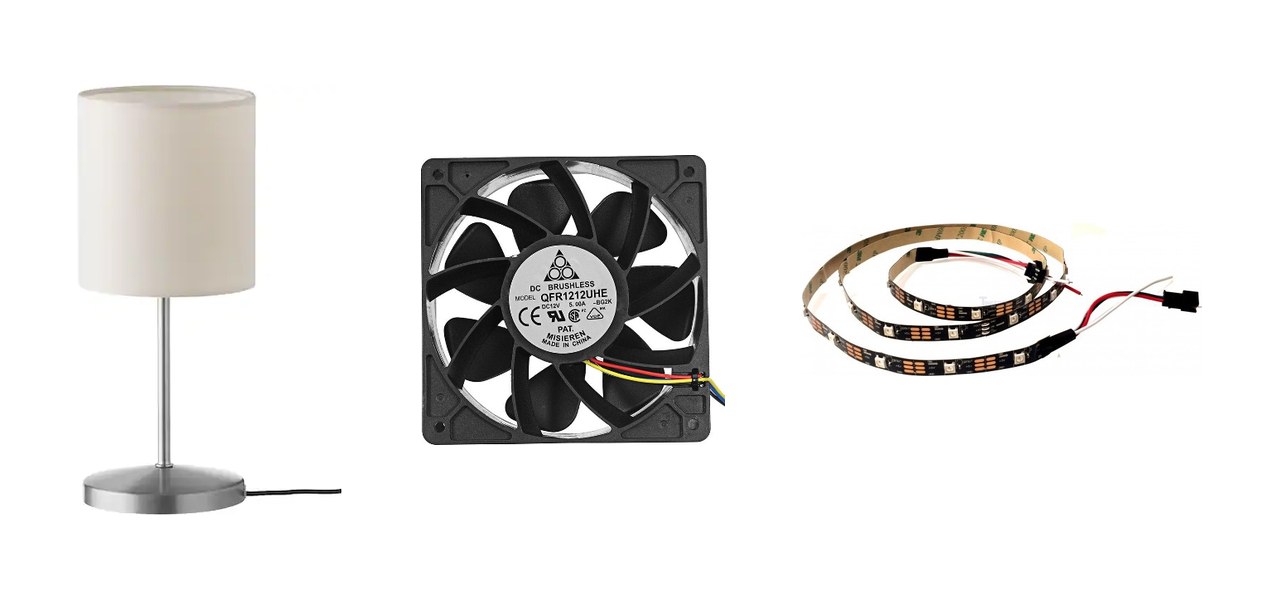
A table lamp, a fan and an RGB LED strip

The connected devices: a table lamp, a fan and an RGB LED strip

SYSTEM ARCHITECTURE

SENSORY PARTRASPBERRY PI 3 B+ANDROID APPSensors2 breadboardsArduino UnoC · ATmega328PnRF24L01TransmitterApache + PHPJSON APIsPython + MySQLlicenta databasenRF24L01ReceiverNetwork layerJSON over Wi-FiHome & WeatherLive tilesActionsTouch & voiceRadio · 2.4 GHzHTTP · local networkSensor dataAction codes SENSORY PARTRASPBERRY PIANDROID APPSensors2 breadboardsArduino UnoC · ATmega328PnRF24L01TransmitternRF24L01ReceiverPython + MySQLlicenta databaseApache + PHPJSON APIsNetwork layerJSON over Wi-FiHome & WeatherLive tilesActionsTouch & voiceRadio · 2.4 GHzHTTP · local networkSensor dataAction codes

System data flow: readings travel from the sensors to the phone, action codes travel back

1. Sensors

Environmental and safety sensors, spread across two breadboards, measure the state of the house.

2. Arduino Uno

Collects the raw signals and processes them into meaningful values, such as light in lux.

3. Radio link

Two nRF24L01 transceivers carry all the readings to the server in a single 32-byte payload.

4. Raspberry Pi 3 B+

Stores the data in MySQL, publishes it as JSON through PHP APIs and commands the connected devices.

5. Android app

Reads the house status over the local network and sends the user's actions back as short codes.

The database is the heart of the system. Sensors write to it, the app reads from it, and every action is stored in it before anything happens. Because the database alone dictates the behavior of the house, the whole system can even be simulated by editing a single row.

THE SENSORY PART

All sensors are connected to the analog and digital pins of an Arduino Uno R3, built around the 8-bit ATmega328P microcontroller running at 16 MHz. The board is programmed in C with the Arduino IDE.

Its 10-bit analog-to-digital converter samples each analog signal into 1024 levels. From there, algorithms turn raw readings into values a person understands: light becomes lux, the SI unit of illuminance, and the microphone signal becomes a noise level.

Collect

The board reads every sensor in turn, over analog pins, digital pins and the I2C bus.

Process

Raw values are converted, calibrated and reduced to compact integers.

Transmit

All readings are packed into one payload and sent to the Raspberry Pi over the radio.

DHT11

Temperature & humidity

A calibrated digital sensor measuring 0–50 °C and 20–90 % relative humidity, both at the same time.

LDR 5528

Light

A photoresistor in a voltage divider with a 10 kΩ resistor. Its resistance drops from MΩ in the dark to a few kΩ in light, and is converted to lux.

DS18B20

Water temperature

A waterproof probe for the pool, measuring from -55 to 120 °C with ±0.5 °C accuracy and up to 12-bit resolution.

SOUND

Noise

An electret microphone module with adjustable sensitivity, flagging a high noise level in the house.

WATER

Rain

Mounted on the roof, its analog output changes with the water on its contacts, revealing both rain and rainfall level.

BMP280

Atmospheric pressure

A Bosch barometric sensor with ±1 hPa accuracy and long-term stability, connected over I2C.

LM393

Soil moisture

A probe in the flower pot tells the owner when the plants need watering.

IR · YG1006

Flame

An infrared phototransistor that sees flames at 760–1100 nm, up to 80 cm away within a 60° angle. It triggers the fire alarm.

MQ-2

Gas

Detects flammable gases such as propane, methane, hydrogen and smoke, with a very fast response. It triggers the gas alarm.

THE RADIO LINK

The sensory part and the server talk wirelessly, through two nRF24L01 transceivers: one set as transmitter on the Arduino, the other as receiver on the Raspberry Pi.

Each module is a complete radio on a chip, working in the 2.4 GHz ISM band at up to 2 Mbps and programmed over SPI. It uses the Enhanced ShockBurst protocol, with packet framing, addressing and CRC error checking handled in hardware, and built-in standby and power-down modes keep its consumption ultra-low.

Enhanced ShockBurst packet

Preamble1 byte
Address3–5 bytes
Control9 bits
Payloadup to 32 bytes
CRC1–2 bytes

Every reading in the house travels in a single payload, from one transceiver to the other.

2.4 GHzISM band
2 Mbpsmax data rate
SPIinterface
240 mmax range

THE SERVER

A Raspberry Pi 3 B+, with a quad-core ARM Cortex-A53 processor and 1 GB of RAM, is the core of the system. It is set up as a server on the local network with the Apache HTTP Server.

Received readings are stored in a MySQL database named licenta, created with phpMyAdmin. Rather than keeping a history, each table holds exactly one row that is updated every time data flows through the system, so it always describes the house right now.

Python script

Receives the radio payload, updates the database and drives the GPIO pins of the connected devices.

MySQL

Two tables: senzori for the sensor readings and actiuni for the control codes.

PHP APIs

Scripts in /var/www/html query the database and publish the result as JSON on the local network.

Live JSON

The JSON page changes every time the database is updated, ready to be fetched by the app.

Two tables, one row each

Database licenta · the tables always hold the current state of the house

senzorisensor readings
  • idint(11)1
  • temperatureint(11)20
  • humidityint(11)68
  • luxint(11)21
  • soundint(11)151
  • fireint(11)1
  • gasint(11)1
  • soilint(11)1
  • rainint(11)450
  • pressureint(11)100634
  • wtint(11)25
actiunicontrol codes
  • idint(11)1
  • lightvarchar(50)'11'
  • ledvarchar(50)'124'
  • fanvarchar(50)'11'
GEThttp://server-ip/api.php
[{
"temperature": 20,
"humidity": 68,
"lux": 21,
"sound": 151,
"fire": 1,
"gas": 1,
"soil": 1,
"rain": 450,
"pressure": 100634,
"wt": 25
}]

CONNECTED DEVICES

The Raspberry Pi controls three devices: a table lamp, a fan and an RGB LED strip. The lamp is plugged in at 220 V, far more than the board can handle, so the lamp and the fan are switched through 5 V relays that open and close the high-voltage circuit. The LED strip is connected directly to the board.

Control goes through the database. Every touch in the app writes the full configuration of the interface as action codes. The Python script reads them and sets the GPIO pins, so the house always matches what the app shows.

ActionsTouch · voicePHP APIUPDATE queryactiunilight · led · fanPythonGPIO controlTable lampRelay · 220 VFanRelayLED stripRGB · directAction codeCurrent state on open ActionsTouch · voicePHP APIUPDATE queryactiunilight · led · fanPythonGPIO controlTable lampRelay · 220 VFanRelayLED stripRGB · directAction codeCurrent state on open

Control loop: every switch in the app becomes a code in the database

RELAY

Table lamp

Switched on or off by hand, or set to turn on automatically in the evening, at 7, 8 or 9 PM.

RELAY

Fan

Started by hand, or automatically when the house gets warmer than 25, 30 or 35 °C. It stops once the temperature drops below the limit.

GPIO

RGB LED strip

Individually addressable LEDs that change color and brightness, or play one of four light shows: Wipe, Theater, Rainbow and Cycle.

Action codes

Each device is driven by a short code: one digit for every control in the app

Light
1on / off1auto hour
Fan
1on / off1auto temp.
LED strip
1on / off4color3brightness

THE MOBILE APP

The app is written in Java with the Android SDK in Android Studio. A single activity hosts three fragments, switched from the bottom menu: Home, Weather and Actions. Each one fetches its data as JSON, from the local server or from the OpenWeatherMap API, and a Read button lets a built-in narrator read the screen aloud.

Home screen with house status tiles

HOUSE STATUS

Home

Tiles show temperature, humidity, light, water temperature, noise, rain and pressure, updated in real time. Unusual values, like high noise or heavy rain, turn red.

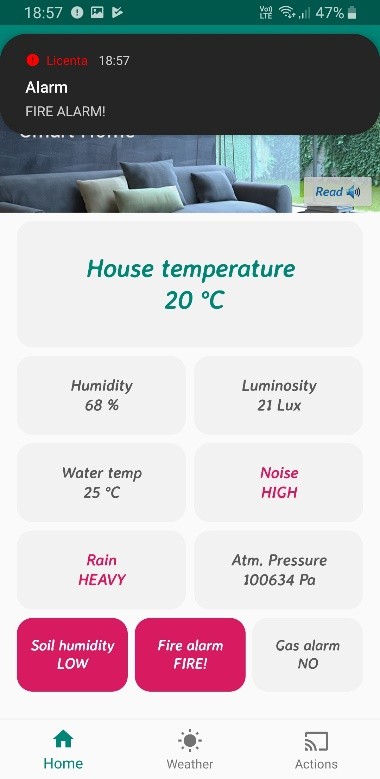
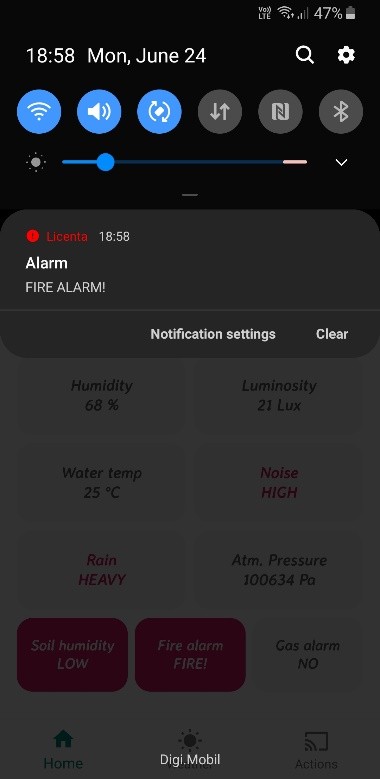
Fire alarm notification over the Home screen

SAFETY FIRST

Alarms

Fire and gas leaks are the most important events. The tile turns red, a notification pops up, the phone vibrates and a spoken alert names the danger.

Fire alarm in the notification shade

ALWAYS REACHABLE

Notifications

Alarms are delivered as system notifications, so they reach the owner even outside the app. When all alarms stop, the phone returns to normal.

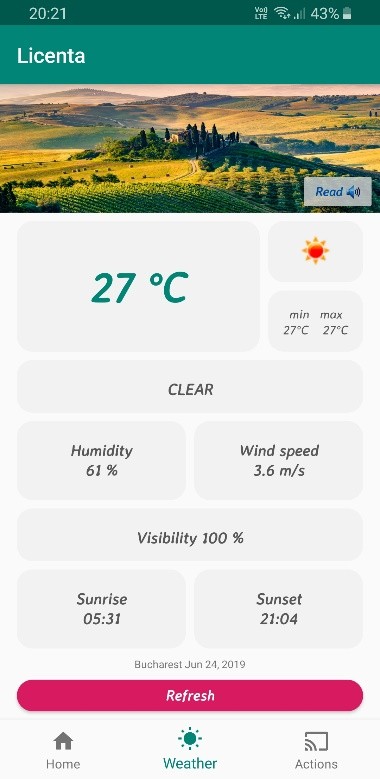
Weather screen for Bucharest

OUTSIDE

Weather

Current conditions in Bucharest from the OpenWeatherMap API: temperature, humidity, wind, visibility, sunrise and sunset, refreshed with custom animations.

Actions screen with switches and sliders

CONTROL

Actions

Switches and sliders for the lamp, fan and LED strip. On opening, the screen loads the current state from the database, so it always matches the house.

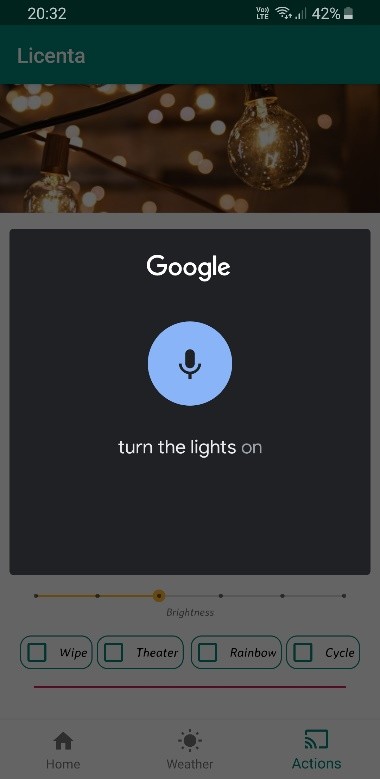
Google speech recognition listening to a command

HANDS-FREE

Voice commands

Press Speak! and say what you need. The app recognizes the command, acts on it and answers back with a spoken confirmation.

VOICE COMMANDS

Voice control lives in the Actions screen. Pressing Speak! starts Google's speech recognizer through a RecognizerIntent, and the recognized words come back to the app as a list.

There is no need for an exact sentence: the app looks for keywords, such as an action, a device and a state. A recognized command performs the same click as a touch would, so voice and touch always stay in sync. Then Text to Speech answers back with a randomly chosen confirmation, or tells you when there is nothing to change.

Turn the lights on

Ok, lights are on!

Turn the lights on

Lights already on!

Set automatic lights to 9 PM

Light · automatic at 9 PM

Change color to yellow

LED strip · yellow

What is the purpose of this project?

This project is being developed for the electronics bachelor's degree.

Real time

Readings and actions flow through the system with low latency.

Safety alarms

Fire and gas alerts arrive instantly, with sound, vibration and a notification.

Hands-free

Control the house and ask questions by voice, with spoken answers.

Modular

New sensors and devices can be added with ease.

RESULTS & NEXT STEPS

Results

A fully working smart home system that monitors the house, warns of danger and controls connected devices by touch or voice. Built from common modules at a low cost, it responds quickly, and centralizing everything in the database proved simple and reliable. It also meant writing code in four languages: C, Python, PHP and Java.

Future direction

Solder the sensors into a compact module with its own casing, and give the server a public IP so the house can be reached from anywhere. In the app, add deeper device configuration, more automatic triggers and support for new device types.