Cinema Booking icon

Case study · Java SE · 2019

Cinema Booking Application

A box-office console for cinema staff. Three Swing windows call a server over Java RMI, and the server keeps films, screenings and tickets in MySQL through JPA.

JavaSwingJava RMIJPA 2.2EclipseLinkMySQLNetBeans GUI Builder
Try the consoleSee the architecture
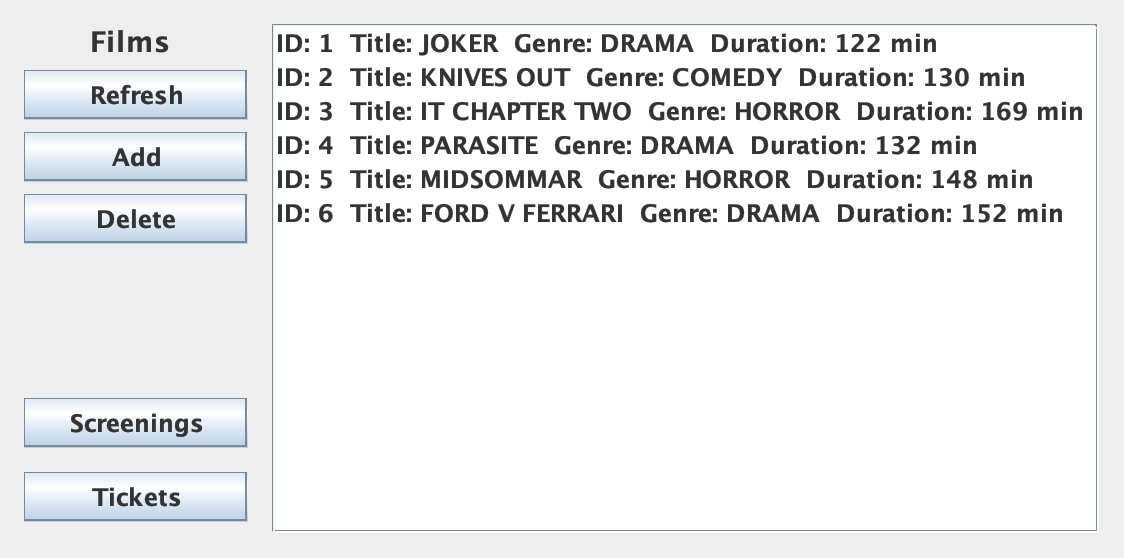
Films Control Panel
Films window listing six films with their genre and length
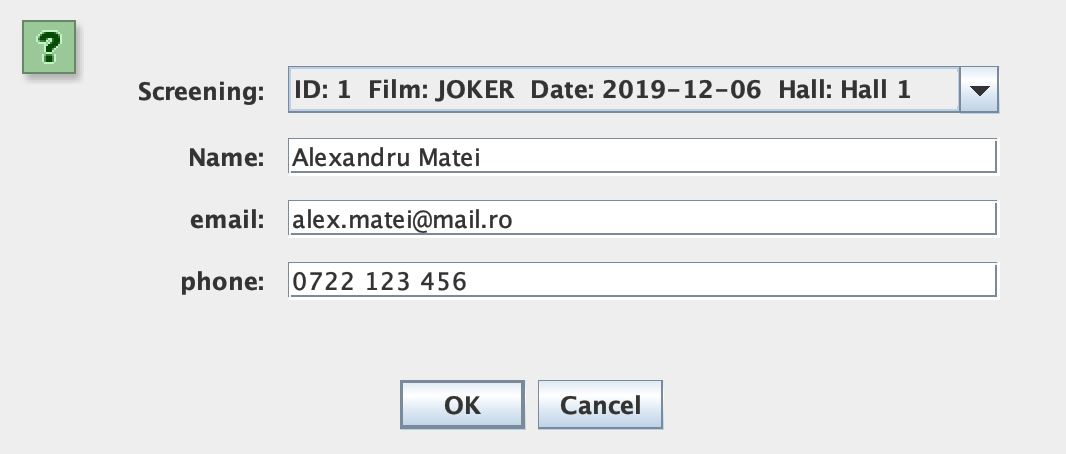
Add Spectator
Sell-ticket dialog with a screening, a name, an email and a phone number

A client–server desktop application, built as the final project of the Java 2 course at university. The cashier works in three small windows, and every button is a remote call to one server that owns the database.

Programme

Add a film with its title, length, genre and cast, list the programme and remove a film by its ID.

Screenings

Schedule a film on a date in one of three halls, from 150 down to 80 seats, and cancel a screening.

Tickets

Pick a screening, type the customer's name and contact details, and sell the ticket. Every sale appears in the ticket list.

3modules
8remote methods
5tables
1234RMI port

THE IDEA

A small cinema runs on three lists: the films in its programme, the screenings scheduled in each hall, and the tickets sold at the desk. Kept in a spreadsheet on one computer, they are out of date the moment a second cashier opens.

This application moves the lists to a server. Each desk runs a light Swing client, and every click is a remote method call over Java RMI. The server stores everything in MySQL through JPA, so all desks see the same programme. It was my final project for the Java 2 course, built to practise distributed objects and object-relational mapping in one real app.

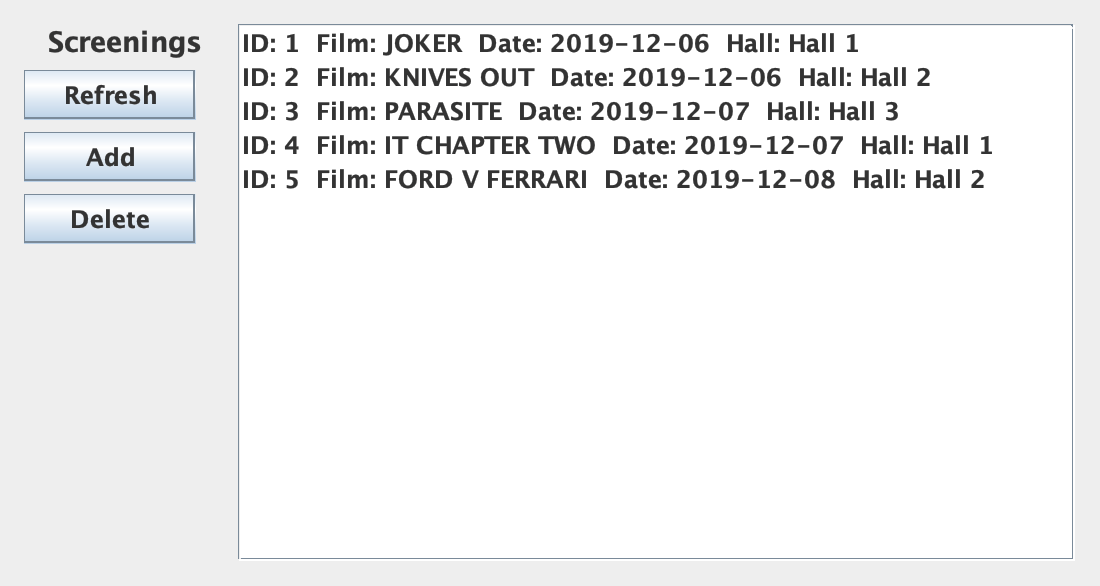
Screenings Control Panel
Screenings window listing five screenings in December 2019

TRY IT

This is the cashier's desktop, rebuilt for the web from the original code, with the same windows, dialogs and messages. Add or delete a film, open Screenings to schedule a screening, or open Tickets to sell a ticket. The log on the right shows each remote call and the SQL that EclipseLink ran for it, taken from a real run of the server.

Films Control Panel

Films

    server.log · EclipseLink

      ARCHITECTURE

      Client JVMServer JVMSwing framesFilms · Screenings · TicketsClientControllerSingletonFilmService stubjava.rmi proxyRMI registry:1234 · "filmService"FilmServiceImplUnicastRemoteObjectDAOsFilm · Screening · SpectatorEntityManagerEclipseLink JPAMySQLjava2projectRemote callLookup · JDBCRequestResult Client JVMServer JVMSwing framesFilms · Screenings · TicketsClientControllerSingletonFilmService stubjava.rmi proxyRegistry:1234FilmServiceImplUnicastRemoteObjectDAOsFilm · Screening · SpectatorEntityManagerEclipseLink JPAMySQLjava2projectRemote callLookup · JDBCRequestResult

      One remote call: from a button in a Swing frame, across RMI, through JPA into MySQL and back

      Publish

      On start, the server creates an RMI registry on port 1234 and binds one service object under the name filmService.

      Look up

      The client fetches a stub for that name once, the first time any window needs data.

      Call

      A button calls a method on the stub. RMI serialises the arguments, runs the method on the server and sends the result back.

      Persist

      The server opens an EntityManager, lets a DAO do the work and commits the transaction to MySQL.

      SHARED

      lib

      The contract: the remote interface and the five entity classes. Both sides compile against it, and every entity is Serializable so it can cross the wire.

      MODULE

      server

      The registry, the service implementation, one DAO per entity and the JPA persistence unit. It is the only part that touches the database.

      MODULE

      client

      Three JFrames and three form panels designed in the NetBeans GUI Builder, plus the controller that holds the RMI stub.

      STORAGE

      MySQL

      One schema, java2project, recreated by EclipseLink from the entities every time the server starts.

      THE REMOTE SERVICE

      Everything the client can do is declared in one interface, FilmService, which extends java.rmi.Remote. It has eight methods: add, list and delete for films and screenings, and sell and list for tickets. Three of them were bonus points in the brief.

      Every method declares RemoteException, because any call can fail on the network. The client never sees the implementation class, only this interface and a generated stub that forwards each call to the server.

      JAVAlib · rmi/FilmService.java
      public interface FilmService extends Remote {

      void addFilm(Film f) throws RemoteException;
      List<Film> listFilms() throws RemoteException;
      void deleteFilm(int id) throws RemoteException;

      void addScreening(Screening d) throws RemoteException;
      List<Screening> listScreenings() throws RemoteException; //BONUS
      void deleteScreening(int id) throws RemoteException; //BONUS

      void sellTicket(Spectator s) throws RemoteException;
      List<Spectator> listTickets() throws RemoteException; //BONUS
      }
      JAVAserver · Server.java + client · ClientController.java
      // server: publish one remote object under a name
      Registry reg = LocateRegistry.createRegistry(1234);
      FilmService filmService = new FilmServiceImpl();
      reg.rebind("filmService", filmService);

      // client: look it up once, behind a lazy singleton
      private ClientController() {
      Registry reg = LocateRegistry.getRegistry(1234);
      filmService = (FilmService) reg.lookup("filmService");
      }

      private static final class SingletonHolder {
      private static final ClientController instance = new ClientController();
      }

      Wiring the two sides takes three lines on the server and two on the client. The server publishes the service in its own registry, and the client looks it up by name.

      The client keeps the stub in a ClientController singleton, created lazily with the holder idiom. Each window asks the controller for data, and the controller wraps every remote call in a try/catch, so a lost connection prints a stack trace instead of closing the app.

      JAVAserver · service/FilmServiceImpl.java
      public class FilmServiceImpl extends UnicastRemoteObject implements FilmService {

      private EntityManagerFactory emf =
      Persistence.createEntityManagerFactory("Project-serverPU");

      @Override
      public void addFilm(Film f) {
      EntityManager em = emf.createEntityManager(); // one per call
      FilmDao filmDao = new FilmDao(em);
      try {
      em.getTransaction().begin();
      filmDao.addFilm(f); // em.persist(f)
      em.getTransaction().commit();
      } finally {
      em.close();
      }
      }
      }

      RMI

      UnicastRemoteObject

      The implementation extends it, so it is exported as soon as it is created and listens for calls on its own port.

      CONCURRENCY

      RMI threads

      Each call runs on an RMI TCP Connection thread, so two desks can be served at the same time.

      JPA

      EntityManager per call

      One shared, thread-safe factory, and a fresh EntityManager for every call, so desks never share a persistence context.

      TRANSACTION

      Begin, commit, close

      Writes run in a transaction and close the EntityManager in finally, whether the commit succeeds or not.

      DATA MODEL

      There is no SQL script in the project. EclipseLink reads the annotations on four entities and generates five tables, dropping and recreating them on every start. The cast of a film becomes a separate Film_ACTORS table, and a ticket buyer's Contact is embedded in the SPECTATOR row.

      FILMID · TITLE · DURATION · GENREFilm_ACTORSFilm_ID · ACTORSSCREENINGID · DATE · FILM · hall_idHALLID · NAME · SEATSSPECTATORID · NAME · EMAIL · PHONEForeign keyTitle copy, no keyReference FILMID · TITLE · DURATION · GENREFilm_ACTORSFilm_ID · ACTORSSCREENINGID · DATE · FILM · hall_idHALLID · NAME · SEATSSPECTATORID · NAME · EMAIL · PHONEForeign keyTitle copyReference

      The schema EclipseLink generated: two foreign keys, one title copied as text, and a stand-alone ticket table

      JAVAlib · entities, condensed
      @Entity
      public class Film implements Serializable {
      @Id @GeneratedValue(strategy = GenerationType.IDENTITY)
      private int id;
      private String title;
      private int duration;
      @Enumerated(EnumType.STRING)
      private Genre genre; // COMEDY, DRAMA, HORROR, TRAGEDY
      @ElementCollection
      private List<String> actors;
      }

      @Entity
      public class Screening implements Serializable {
      @Id @GeneratedValue(strategy = GenerationType.IDENTITY)
      private int id;
      private String film; // the title, not a relation
      @Temporal(TemporalType.DATE)
      private Date date;
      @OneToOne(cascade = CascadeType.ALL)
      @JoinColumn(name = "hall_id")
      private Hall hall;
      }
      SQLgenerated by EclipseLink · drop-and-create
      CREATE TABLE SCREENING (ID INTEGER AUTO_INCREMENT NOT NULL, DATE DATE,
      FILM VARCHAR(255), hall_id INTEGER, PRIMARY KEY (ID))
      CREATE TABLE FILM (ID INTEGER AUTO_INCREMENT NOT NULL, DURATION INTEGER,
      GENRE VARCHAR(255), TITLE VARCHAR(255), PRIMARY KEY (ID))
      CREATE TABLE HALL (ID INTEGER AUTO_INCREMENT NOT NULL, NAME VARCHAR(255),
      SEATS INTEGER, PRIMARY KEY (ID))
      CREATE TABLE SPECTATOR (ID INTEGER AUTO_INCREMENT NOT NULL, NAME VARCHAR(255),
      EMAIL VARCHAR(255), PHONE VARCHAR(255), PRIMARY KEY (ID))
      CREATE TABLE Film_ACTORS (Film_ID INTEGER, ACTORS VARCHAR(255))
      ALTER TABLE SCREENING ADD CONSTRAINT FK_SCREENING_hall_id
      FOREIGN KEY (hall_id) REFERENCES HALL (ID)
      ALTER TABLE Film_ACTORS ADD CONSTRAINT FK_Film_ACTORS_Film_ID
      FOREIGN KEY (Film_ID) REFERENCES FILM (ID)
      ENTITY

      Film

      Title, length in minutes, a genre stored by name, and an @ElementCollection of actors.

      ENTITY

      Screening

      A screening: the film title, a date and a hall, saved together through cascade = ALL.

      ENTITY

      Hall

      A hall with a name and a seat count: Hall 1 has 150 seats, Hall 2 120 and Hall 3 80.

      ENTITY

      Spectator

      The ticket buyer: a name and an @Embedded contact with email and phone, in the same row.

      THE APP

      The client is plain Swing with the default Metal look. Each window is a JFrame with a column of buttons and a JList, and every form is a JPanel shown inside a JOptionPane, so OK, Cancel and the messages come for free. These are real screenshots, taken by running the code with its interface translated to English.

      Films Control Panel
      Films window with six films

      FILMS

      Films

      The main window. Refresh, add and delete films, and open the other two windows.

      Screenings Control Panel
      Screenings window with five screenings

      SCREENINGS

      Screenings

      Every screening with its film, date and hall.

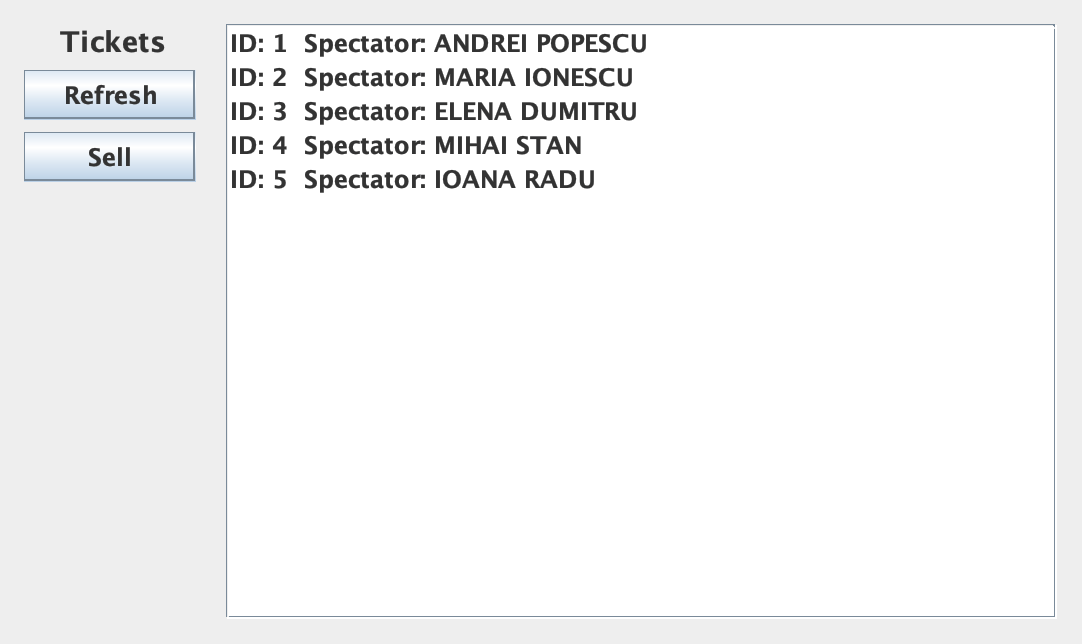
      Tickets Control Panel
      Tickets window with five sold tickets

      TICKETS

      Tickets

      Every ticket sold, by the customer's name. Sell opens the sale form.

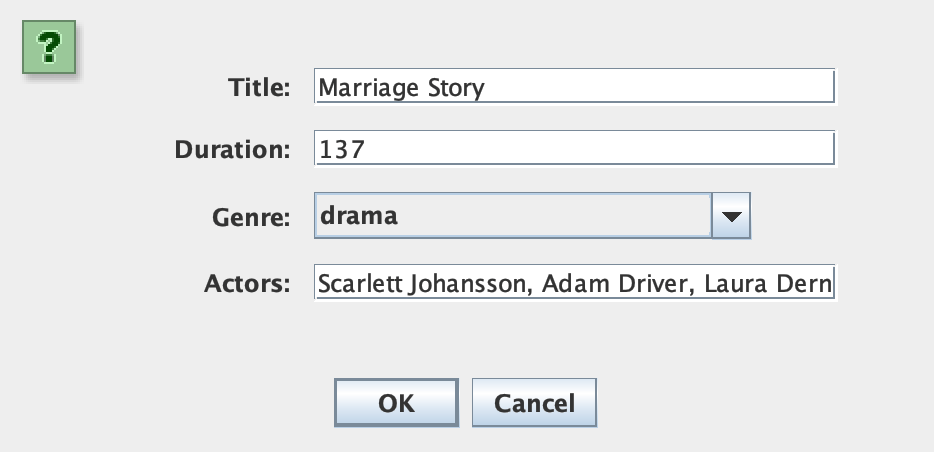
      Add Film
      Add-film dialog with title, length, genre and cast

      ADD

      New film

      Title, length, a genre list and the cast, separated by commas.

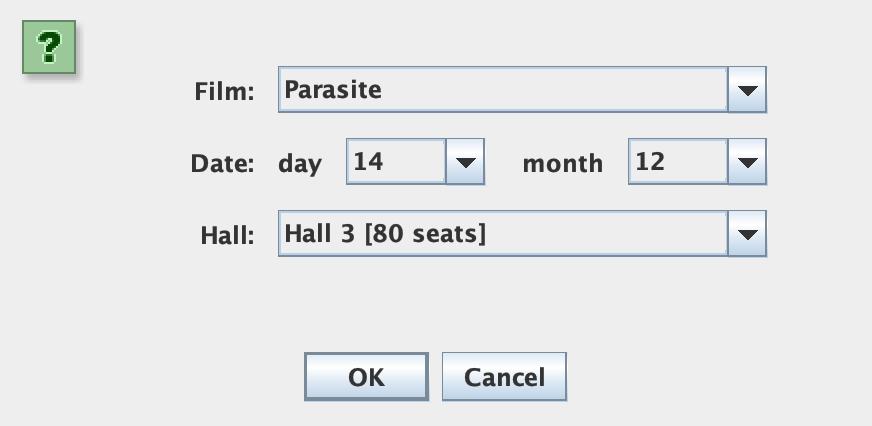
      Add Screening
      Add-screening dialog with film, day, month and hall

      ADD

      New screening

      Films come from the server. Day, month and hall are lists.

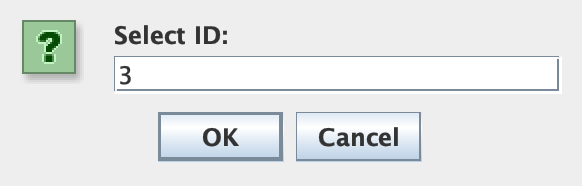
      Input
      Input dialog asking for the ID to delete

      DELETE

      Delete

      Deleting asks for the ID shown in the list, then confirms with a message.

      SELLING A TICKET

      Sell opens a form with every screening in a drop-down, labelled with its film, date and hall. The cashier types the customer's name, email and phone and presses OK.

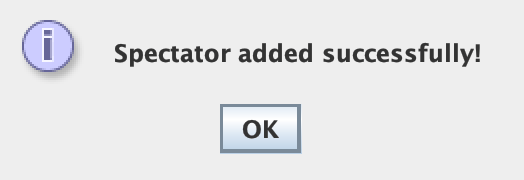
      The client fetches the screenings again and builds a Spectator with the name. One remote call, sellTicket, sends it to the server, which inserts it in one transaction. A message confirms the sale and the ticket list refreshes. Looking back at the code, two lines never did what they were meant to, and the log in the demo shows both.

      Add Spectator
      Sell-ticket dialog filled in for the Joker screening
      Message
      Confirmation message: Spectator added successfully!
      JAVAclient · gui/TicketFrame.java · sellTickets()
      List<Screening> screeningList = ClientController.getInstance().listScreenings();
      String selectedScreening = sellTicketPanel.getJComboBox1();
      for (Screening x : screeningList) {
      if (x.getFilm().equals(selectedScreening)) { // "Joker" vs "ID: 1 Film: JOKER ..."
      screening = x;
      }
      }

      Contact c = new Contact();
      c.setEmail(email);
      c.setPhone(phone);

      Spectator s = new Spectator();
      s.setName(name);
      // s.setContact(c);

      ClientController.getInstance().sellTicket(s);
      JOptionPane.showMessageDialog(this, "Spectator added successfully!");

      1

      Pick a screening

      The drop-down shows each screening's toString(), so the cashier sees the film, the date and the hall.

      2

      Match it

      The loop compares a title with that full label, so it never matches, and the result is not used anyway.

      3

      Contact

      The email and phone are read, but setContact is commented out, so both columns stay NULL.

      4

      Sell

      One INSERT into SPECTATOR, a confirmation and a refreshed list. The sale itself always works.

      UNDER THE HOOD

      CONFIG

      persistence.xml

      One persistence unit, Project-serverPU, with the EclipseLink provider, the MySQL connection and drop-and-create schema generation.

      JAVA

      DAOs

      FilmDao, ScreeningDao and SpectatorDao wrap persist, find and remove, and list with JPQL queries such as SELECT f FROM Film f.

      SWING

      GUI Builder

      Every window and form was laid out in the NetBeans designer. Its .form files are still in the project next to the code.

      TODAY

      How it was captured

      For this page, I translated the interface from Romanian to English, ran the code with H2 in MySQL mode instead of a MySQL server, and rendered the real windows to images.

      RESULTS & NEXT STEPS

      Results

      A working three-tier desktop app: a Swing client, an RMI server and a MySQL database, with eight remote methods, a schema generated from annotations, and several desks sharing the same data.

      What I would fix

      Seats are not counted: only each hall's capacity is stored. A ticket is not linked to its screening, the contact is not saved, every screening creates a new hall row, the year is fixed to 2019, inputs are not validated, and list calls never close their EntityManager.

      Future direction

      Turn the server into a Spring Boot REST API with Spring Data JPA, make Ticket a real entity linked to a screening and a seat, reuse a fixed set of halls, and replace the lists with a clickable seat map so the cashier can see what is still free.